
How to Clean a Baby Monitor: The Germ Reality
Related: Baby Monitor Video Quality Explained: Night Vision Is the Spec
Well, here's a fun fact I learned the hard way: nobody cleans their baby monitor until their kid sneezes directly into the camera lens. That was me, month 7, wiping a fine mist of baby snot off the lens of my Infant Optics with the corner of a sleep sack.
So let's talk about what actually needs cleaning, what you're making worse by scrubbing, and what I've learned after 14 months of living with these things.
The short version: your baby monitor is gross. The long version involves a breakdown of what each material needs, which cleaners wreck the night vision, and why you should probably clean the parent unit more often than you clean your phone. Which, for me, is basically never. So we're already behind.
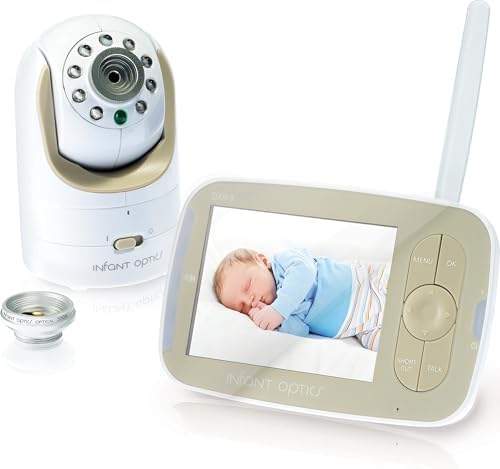
Infant Optics DXR-8
Local feed, no app, no subscription, lens wipes clean in seconds
Battery degrades after a year
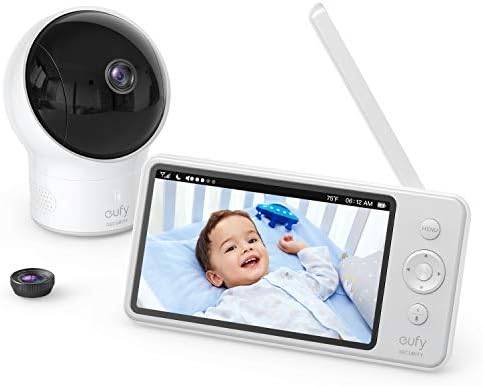
Eufy SpaceView
Night vision that actually shows the crib, easy wipe-down
Stiff buttons, cheap-feeling screen
PwrON DC 5V Adapter Fits for Motorola MBP33S MBP36S MBP36XL MBP38S MBP41S...
Big screen, good range, split screen for two cameras
More camera hardware means more app dependence, not simpler feeding.
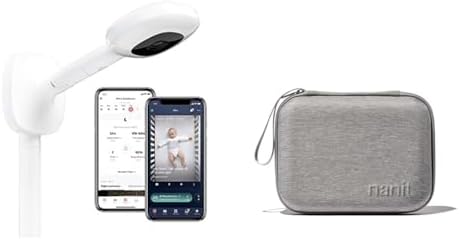
Nanit Pro
Best video quality, accurate breathing tracking
~$100/year subscription, breathing band slips off
Prices and availability were captured from Amazon Creators API and may change.
Every monitor I've tested has the same fundamental issue: the lens sits right where baby breath, spit-up mist, and airborne diaper cream particles land. The video quality on the Nanit Pro is genuinely the best I've seen, but that lens catches everything. I cleaned my daughter's Nanit lens in week 3 and found a film of something I do not want to identify.
The fix is simple. Microfiber cloth, dry, gentle circular motion. No paper towels, no tissue, no shirt sleeve. Paper towels scratch the coating and you'll end up with a permanent blur in the corner of every night video. I learned this after using my shirt on the Eufy and spending a week staring at a smudge I couldn't get off.
For dried-on gunk, breathe on the lens first. The moisture from your breath loosens it. Then microfiber. That's it. No lens cleaner, no alcohol, no Windex. The coatings on these lenses are not built for chemicals.
The parent unit is a petri dish
Here's what nobody tells you: the parent unit sits next to your bed, gets touched with the same hands that just changed a diaper, and then you press it against your face at 2 a.m. to check if the crying is real or just static. I cleaned my Infant Optics parent unit for the first time after six months and the screen had a visible layer of.. life.
The body of the unit wipes down with a slightly damp microfiber cloth. Not wet. Damp. You do not want moisture in the speaker grille or the charging port. I killed a Motorola parent unit in month 4 by wiping it with a too-wet cloth and getting water in the charging port. It stopped holding a charge within a week. That was a ~$119 lesson.
The screen itself is the same deal as the lens. Dry microfiber, gentle pressure. No alcohol wipes. I know the alcohol wipes are right there. I know they seem convenient. They will strip the anti-glare coating and you'll be squinting at a washed-out image forever.
What actually needs disinfecting
The parts of the monitor that touch your baby: the camera housing, the stand, the cords. The parts that don't touch your baby but you touch constantly: the parent unit, the buttons, the charging cable.
For the camera housing and stand, a disinfecting wipe that's been wrung out until it's barely damp works fine. Wipe, then follow with a dry cloth. Let it air dry completely before you plug it back in. I do this once a week with the Eufy because it lives on a shelf above the changing table, which is the germ epicenter of the nursery.
The cords are the thing everyone forgets. The charging cable for the parent unit gets dragged across floors, shoved in diaper bags, and chewed on by my beagle Biscuit, who thinks any cord is a toy. Wipe those down weekly. They're gross. I don't know how they get so gross, but they do.
The sleep sack theory of monitor hygiene
I have a theory about why some monitors stay cleaner than others. It's not about the monitor. It's about where it lives. The Infant Optics sits on a shelf across the room, out of reach, pointed at the crib. It doesn't collect much because it's not near the action.
The Nanit, when I had it, mounted on the wall above the crib. That position collects dust and whatever floats up from the mattress when your kid rolls over. I was cleaning that lens weekly. The wall mount also meant I couldn't easily reach it without a step stool, so I'd put off cleaning it, and then the night vision would get hazy and I'd panic.
My practical advice: mount your camera somewhere you can reach without furniture gymnastics. If you need a step stool to clean it, you won't clean it. You'll just live with the haze.
The sensor pad complication
The Babysense sensor pad is a whole different cleaning situation. A sensor pad that goes under the mattress, which means it's sandwiched between the mattress and the crib base, collecting dust and dead skin and whatever else lives in that microclimate.
I had one for exactly one month before I threw it in a drawer. Priya, a second-time mom I talked to, had hers false-alarm six times in one night and unplugged it permanently.
"I was more scared by the monitor than by SIDS," she said. That's the energy you're dealing with.
If you do use a sensor pad, wipe it with a damp cloth when you change the sheets. That's the cadence. Every sheet change, wipe the pad. It takes thirty seconds. The pad itself doesn't need disinfecting because it's not touching your baby directly. It's touching the mattress. But it does collect dust, and dust can affect sensitivity over time.
What about the app-based monitors?
The Owlet Cam has the best video quality I've tested, but it crashes when your Wi-Fi blinks. That's a documented complaint pattern. Parents on forums report disconnects multiple times a week. So you're paying ~$249 for a camera that works great until your router hiccups.
For cleaning, the Owlet is actually easier than most. The camera body is smooth plastic, wipes down fast, and the lens is recessed enough that it doesn't collect as much airborne gunk. But the app has a feature that shows you a live feed thumbnail on your phone, and cleaning your phone is a separate battle I'm not qualified to fight.
The audio-only reality check
Dan, a dad of two who had his Motorola screen die during a nap, went back to a ~$30 VTech audio-only unit for three days and realized he didn't miss video at all. "You don't need video. You need your sleep," he told me. He's right.
The VTech audio units are also dramatically easier to clean. No lens, no screen, just a plastic box with a speaker grille. Wipe it down, done. The grille collects dust, which you can pick out with a dry toothbrush, but that's a twice-a-year job.
I don't track prices day to day, so I won't pretend to know next week's deals. But the VTech DM221 is under ~$35 and has survived two years of my household without a single issue. That's the dumb monitor defense. You don't need to watch your kid sleep. You need to hear them cry.
The actual step-by-step
Here's my routine, which I've refined over 14 months and two babies and one beagle who thinks the night vision is his personal spotlight.
Weekly: wipe the camera housing and stand with a wrung-out disinfecting wipe. Dry with a cloth. Wipe the parent unit body with a damp microfiber cloth. Dry. Clean the lens and screen with a dry microfiber cloth.
Monthly: wipe all cords. Unplug everything first. Let it fully dry before plugging back in. Check the lens for haze and do a deeper clean if needed.
Quarterly: take the whole thing down and inspect it. Check for damage, loose mounts, cracked plastic. I found a hairline crack in the Eufy's stand mount in month 9. It still works, but I know it's there.
Why this matters
The stakes here are lower than the sensor pad debate. A dirty lens doesn't cause SIDS. But a dirty lens means you can't see whether your kid is breathing at 2 a.m., and that's the whole point of the monitor. If the night vision is hazy because you used a paper towel and scratched the coating, you've spent ~$200 to look at a blur.
I've made every mistake in this article. I used my shirt. I used alcohol wipes. I got water in a charging port. I killed a perfectly good Motorola because I was in a hurry. Learn from my stupidity.
The bottom line
Clean the lens with a dry microfiber cloth and nothing else. Wipe the housing with a barely damp cloth. Don't get water anywhere near the ports. And if you're choosing between a monitor that's easy to clean and one with better video quality, buy the easy one. You'll actually clean it.